
Switching workout trackers: keep your history
When switching workout trackers, save your original CSV first. Then check exercise matches and a workout you know.
Before switching workout trackers, save an export
The current build imports workout CSV files from Hevy and Strong. First, keep an untouched copy of the export. A CSV does not move your account, followers, photos or paid plan.
Review the exercise matches
Check the names and units in the import review. If an entry needs a choice, resolve it before you continue. Similar names can refer to different moves or machines.
Check a workout you know
After the import, compare a familiar session with the source file. Next, check dates, sets, weights and reps. If they differ, contact support before you rely on the charts.
GameLiftEat is in development. For now, get launch updates to hear when it opens.
Workout progress tracking with context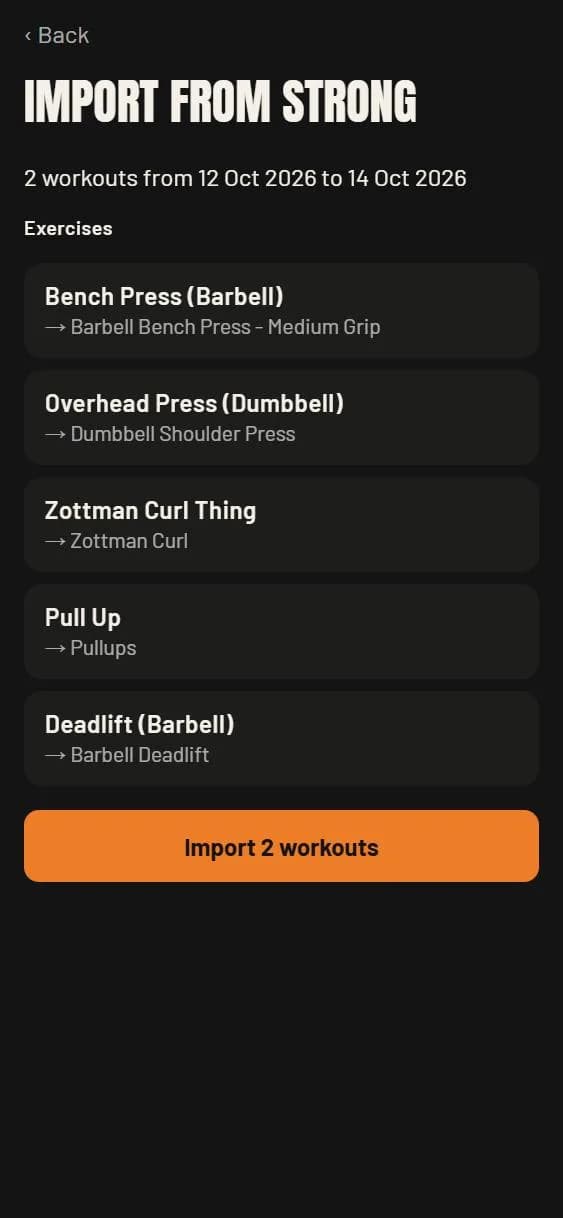
Your next session
Get launch updates
through Field Notes.
GameLiftEat is in development. For now, Field Notes is where you can hear about the launch. The newsletter also covers training, food and everyday life.
The app will be free at launch. We will announce future pricing later.